


Smart homes are in vogue, and so are smart ceiling fans. But does buying a smart ceiling fan mean it will automatically work with your smart home?
No. A smart ceiling fan will not necessarily work with every smart-home ecosystem. Compatibility depends on the specific fan, its smart-control system, and the platform you use.
A fan may be called “smart” because it connects to a mobile app, yet still not work with the smart-home system you already use. Another may work with Alexa or Google Home but require a separate app, controller, bridge, or other integration to connect.
So, which smart ceiling fan works with your smart home?
The answer depends on what you want the fan to do, which smart-home ecosystem you use, such as Amazon Alexa, Google Home, Apple Home, or Samsung SmartThings—and how the fan connects.
The good news? You don't need to be a technology expert to make the right choice.
This guide breaks smart ceiling fan compatibility down into simpler language, so you can understand what the different technologies mean, determine whether you need a controller or bridge, see what you can actually control, and know what to check before you buy.
Technology reviewed: September 2026
Smart-home integrations, apps, controllers, bridges, and Matter support can change over time. Always verify compatibility for the exact fan model and current manufacturer specifications before purchasing.
First, What Do You Want Your Smart Ceiling Fan to Do?
Before comparing Wi-Fi, Bluetooth, Matter, or smart-home platforms, start with a simpler question:
What do you actually want your fan to do?
Depending on the fan and its control system, a smart ceiling fan may let you turn it on or off from your phone, change the fan speed, reverse its direction, control an integrated light, dim the light, create schedules, or add the fan to smart-home routines and scenes. Some setups also allow voice control or let the smart-home system use the fan's status in an automation.
Not every fan supports every function through every smart-home platform. That's why “Is this fan smart?” is not the best buying question.
A better question is: “What can I control, and can I control it the way I want?”
For example, if you only want to adjust your fan from your phone, an app-controlled fan may be enough. If you want to say, “Alexa, set the bedroom fan to speed 2,” you need compatible voice-assistant integration. And if you want the fan to turn on as part of a bedtime routine, you need an ecosystem and control system that supports the appropriate automation.
If you are trying to make an existing ceiling fan smart, the decision is different again. You may need a compatible receiver, controller, bridge, or upgrade kit instead of replacing the entire fan.
Your desired outcome should determine the technology, not the other way around.

Which Smart-Home System Do You Use?
Once you know what you want your fan to do, identify the smart-home platform you already use.
Common options include:
- Amazon Alexa
- Google Home
- Apple Home
- Samsung SmartThings
This matters because smart-fan compatibility is not universal. A fan may be controllable through its manufacturer's app but not integrate with your preferred smart-home platform. Or it may support one smart-home platform but not another.
If you already use a particular ecosystem throughout your home, start there when comparing fans. It is usually easier to choose a fan that fits the system you already understand than to build your smart-home setup around a new fan.
Alexa
If you use Alexa, look for explicit Alexa compatibility for the exact fan or smart-control system. Then check what Alexa can actually control. Basic on/off control and more advanced functions such as speed or light control are not necessarily the same thing.
Google Home
If you use Google Home, verify that the exact fan or control system supports Google Home or Google Assistant. Also check which fan and light functions are available through the integration.
Apple Home
If Apple Home is your preferred platform, look for explicit Apple Home or HomeKit support for the exact product or control system.
An app that works on an iPhone does not automatically mean the fan can be added to Apple Home. If the fan uses Matter, also check the current Apple Home requirements for the specific setup.
Samsung SmartThings
If you use SmartThings, check the exact fan and control system before buying. Don't assume that compatibility with Alexa or Google Home automatically means compatibility with SmartThings.
The rule to remember
Check the exact fan model and control system, not just the word “smart.”
Smart-home integrations can depend on the model, hardware, software, or connection method. When information is unclear, the manufacturer's current product documentation should be your final check.
How Does Smart Ceiling Fan Compatibility Work?
Smart ceiling fan compatibility becomes much easier to understand when you separate the different technologies involved.
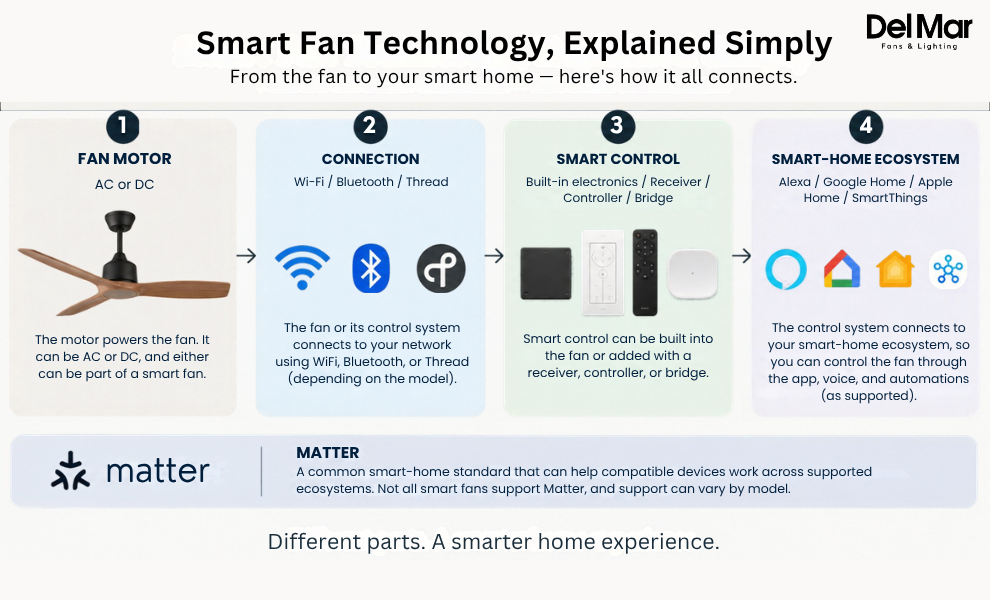
Think of the setup as four connected layers:
Fan motor → Connection → Smart control → Smart-home ecosystem
Each layer has a different job, and confusing one layer with another is where smart-fan shopping can get complicated.
The Fan Motor
A ceiling fan can use an AC or DC motor. The motor powers the fan, but it does not, by itself, determine whether the fan is smart.
A DC motor does not automatically make a fan smart, and an AC motor does not automatically prevent smart control. If you're upgrading an existing fan, however, the motor type can matter because some smart-control hardware is designed only for particular fan configurations.
The Connection
A smart fan or its controller may communicate using technologies such as Wi-Fi, Bluetooth, or Thread.
Wi-Fi connects a fan or controller to your home network and is commonly used for app and smart-home control. Bluetooth provides short-range wireless communication and may be used for pairing, setup, local control, or a remote, depending on the product. Thread is a low-power mesh networking technology used by some newer smart-home devices.
These are connection methods. They are not the same thing as Alexa, Google Home, Apple Home, SmartThings, or Matter.
The Smart Control
Something still has to turn your command into an action. Depending on the fan, that control may come from electronics built into the fan, a wireless receiver, a wall control, a smart controller, a bridge, or an upgrade kit.
This is one reason two fans can both be advertised as “smart” but have very different setups.
The Smart-Home Ecosystem
Finally, there is the platform where you want to control the fan:
Alexa / Google Home / Apple Home / SmartThings
This is where compatibility becomes a buying decision. A fan can have Wi-Fi and an app without necessarily working with the ecosystem you already use.
App Control vs. Smart-Home Compatibility
Here's one of the most important distinctions to understand:
Having an app does not automatically mean having smart-home compatibility.
Imagine this:
Manufacturer app → Fan
You can open the app and change the fan speed. That's useful, but it doesn't necessarily mean your fan appears inside Apple Home, Google Home, Alexa, or SmartThings.
Smart-home integration looks more like:
Smart-home platform → Compatible integration or controller → Fan
That's what allows the fan to become part of a broader connected home.
So if you already use Alexa throughout your house, don't just ask: “Does this fan have an app?”
Ask: “Can Alexa control this exact fan, and what can it control?”
The same principle applies to Google Home, Apple Home, SmartThings, and other smart-home platforms.

What Can You Actually Control?
A fan being compatible with your smart home is only part of the decision. You also need to know what the integration actually lets you control.
Depending on the fan, controller, and ecosystem, you may have access to:
| Smart Feature | What It Means |
|---|---|
| On/off | Turn the fan on or off remotely |
| Speed control | Adjust airflow without using the physical control |
| Multiple speed levels | Make finer comfort adjustments |
| Reverse | Change airflow direction when supported |
| Light control | Control an integrated fan light |
| Dimming | Adjust light brightness when supported |
| Scheduling | Automatically run the fan at set times |
| Scenes and routines | Make the fan part of a larger smart-home routine |
| Status or state | Allow the smart-home system to use the fan's current status in supported automations |
Don't assume that because a fan supports one smart function, it supports all of them. A product may allow app-based speed control while offering different capabilities through a voice assistant or smart-home platform. Always check the functions available through the specific control method you plan to use.
Why Does State Awareness Matter?
Consider the difference between:
“Turn the fan on.”
and:
“If the fan is off, turn it on as part of my routine.”
The second approach depends on the smart-home system being able to work with the device's current state or supported automation functions.
For a shopper, the takeaway is simple:
Don't just ask whether a fan is compatible. Ask which functions are supported through that compatibility.
Can a Smart Ceiling Fan Automate Your Comfort?
The real advantage of smart-home integration isn't simply being able to say:
“Turn on the fan.”
It's being able to make the fan part of your everyday routines.
For example, a bedtime routine might dim the lights, turn on the fan, and set it to a preferred speed. A leaving-home routine could turn the fan off when the home becomes unoccupied, while a morning routine could adjust the fan to a preferred setting.
Bedtime
Lights dim → fan turns on → preferred fan speed
Leaving Home
Home becomes unoccupied → fan turns off
Morning
Morning routine starts → fan adjusts to a preferred setting
Whole-Home Scene
Movie night → lights dim → fan changes to a preferred speed
The exact automations available depend on the fan, ecosystem, controller, and supported functions. A broader smart-home system can also use information from compatible devices—such as occupancy or temperature sensors, to trigger an automation.
Smart-home automation is often about how devices work together, not just how “smart” one individual fan is.
Do You Need a Bridge, Controller, or Hub?
Sometimes, and this becomes especially important if you are trying to make an existing ceiling fan smart.
A new smart fan may have the necessary technology built in, while an existing fan may need additional hardware. A simplified retrofit setup could look like:
Existing fan → Smart receiver/controller → Smart-home system
The exact role of a bridge, controller, receiver, or hub varies by product. The important thing for a homeowner is understanding that the additional hardware can be the link between an existing fan and the smart-home system you want to use.
If You're Buying a New Fan
Look for a model with built-in smart functionality if you want the simplest setup. You should still verify the exact ecosystem and controls supported by that model.
If You Already Own a Fan
First find out:
- What type of motor it has
- How it is currently controlled
- Whether it has a receiver
- Whether that receiver can be replaced
- Whether compatible smart upgrade hardware exists
- Don't buy a random smart controller simply because it says it works with ceiling fans. Compatibility can depend on the fan's motor, wiring, receiver, and control method.
The decision is different for an existing fan than for a new smart fan.

Which Smart Ceiling Fan Setup Is Right for You?
Your best setup depends on what you already have and what you want to accomplish.
If You're Buying a New Fan
A fan with built-in smart functionality and documented compatibility with your existing ecosystem is usually the simplest option.
Before buying, check your preferred smart-home ecosystem, the exact fan model, its control system, any required app or account, additional hardware, and the fan and light controls available through the integration.
If You Already Own a Remote-Controlled Fan
A compatible bridge or upgrade kit may let you add smart control instead of replacing the fan. But check the existing fan's motor, receiver, and control system first.
If compatible hardware isn't available for your particular setup, replacing the fan may ultimately be the simpler option.
If You Use Apple Home
Prioritize documented Apple Home or HomeKit support, or confirmed Matter compatibility for the exact product.
Don't assume that an iPhone-compatible app means the fan can be added to Apple Home.
If You Use Multiple Smart-Home Platforms
Look for a system that supports the platforms you actually use.
Matter may help with cross-platform interoperability, but it does not guarantee that every fan function will work identically across every supported platform.
If You Only Want App Control
You may not need Alexa, Google Home, Apple Home, SmartThings, or Matter at all.
If smartphone control, scheduling, timers, and the available fan functions are all you need, an app-controlled fan may be enough.
What Does Matter Mean for Smart Ceiling Fan Compatibility?
If you have been researching smart-home products recently, you have probably seen the word Matter.
Matter is a smart-home interoperability standard designed to help compatible devices work across supported smart-home ecosystems. In simpler terms, it provides a common way for compatible smart-home devices to communicate with supported platforms.
Matter is already relevant to smart fans. Google Home lists Fan as a supported Matter device type, with Fan Control and On/Off capabilities, while Amazon's current Alexa documentation also lists fans among its supported Matter device categories.
But Matter does not mean:
- Every smart fan supports Matter
- Every Matter-enabled fan works with every platform
- A fan becomes smart simply because it uses Wi-Fi
- Every fan function will automatically be available on every platform
- Instead, you still need to check the details.
If a fan or smart controller supports Matter, verify:
- Whether the exact product is Matter-enabled
- Which smart-home platforms support that device
- Whether a Matter controller or other hardware is required
- Which fan and light functions are supported
- Whether the manufacturer's app is still needed for setup or advanced features
Does Matter Mean a Fan Works With Everything?
No.
Matter can make interoperability easier, but it does not eliminate the need to check the exact product and its supported features.
Hunter fans provide a useful real-world example. Its current guidance says the company is transitioning eligible HunterSMART fans toward Matter, but the path can depend on the fan model and hardware configuration. For some fans, the transition may involve a software update; for others, replacement hardware may be required.
That's an important distinction for shoppers: even when a manufacturer is moving toward Matter, you still need to check the exact fan you're buying or upgrading.
The simplest way to think about it is:
Matter can help compatible devices work across supported smart-home ecosystems. It does not guarantee universal compatibility.
Smart Ceiling Fan Compatibility Problems to Watch For
Even a fan advertised as smart can run into compatibility issues.
| Problem | What It Usually Means |
|---|---|
| The app works, but the fan doesn't appear in your smart home | App control and ecosystem compatibility are different |
| Your voice assistant can't control the fan | The ecosystem or integration may not be supported |
| Only some functions work | The ecosystem may support basic controls but not every fan feature |
| A bridge is required | The fan does not connect directly to your smart-home platform |
| An upgrade kit doesn't work | The fan's motor, receiver, wiring, or control type may be incompatible |
| Automation doesn't work as expected | The required function, status, or integration may not be exposed to the ecosystem |
| Matter is listed, but setup doesn't work | The exact model, controller, network, or supported device type may not match |
The key lesson is simple: Compatibility isn't just “yes” or “no.” It's about whether the complete setup works the way you want. That means checking the fan, its control hardware, the connection method, the smart-home ecosystem, and the functions you actually care about.
How to Check a Smart Ceiling Fan Before Buying
Once you know your ecosystem and desired features, use this checklist to verify the setup.
1. Check Your Smart-Home Ecosystem
Start with the platform you already use: Alexa, Google Home, Apple Home, or SmartThings.
2. Check the Exact Fan Model
Don't rely only on the brand name. Different models from the same manufacturer can have different control systems and integrations.
3. Check Whether an App Is Required
Some fans require the manufacturer's app for initial setup or ongoing control. An app may also provide functions that aren't available through a third-party smart-home platform.
4. Check for a Hub, Bridge, or Controller
Determine whether additional hardware is needed for the setup you want.
5. Check the Available Controls
Don't stop at:
“Works with Alexa.”
Confirm whether the integration supports the functions you actually need:
- On/off
- Fan spee
- Light
- Control
- Dimming
- Scheduling
- Automations
- Direction control
- Other model-specific features
6. Check the Connection Method
Review whether the fan uses Wi-Fi, Bluetooth, Thread, or another connection method, and understand what that connection is used for.
7. Check Current Compatibility Information
Smart-home integrations can change with software, firmware, platform updates, and new hardware.
Verify the manufacturer's current information for the exact model before purchasing.
The Smart Ceiling Fan Buying Checklist
Before you purchase, ask:
☐ Which smart-home ecosystem do I use?
☐ What do I actually want the fan to do?
☐ Does the exact fan model work with my ecosystem?
☐ Does it require a manufacturer's app?
☐ Does it need a bridge, hub, receiver, or controller?
☐ Which fan and light functions can I control?
☐ If I'm upgrading an existing fan, is my motor and receiver compatible?
☐ If it uses Matter, what ecosystems and functions does it support?
☐ Will the fan itself suit my room in terms of size, airflow, mounting, lighting, and design?
If you can answer those questions, you don't need to understand every piece of technology behind the product.
You simply need to know that the pieces work together.
Find a Smart Ceiling Fan That Fits Your Setup
Choosing a smart ceiling fan becomes much easier when you start with your existing home and desired experience, rather than the technology itself.
First, identify your smart-home ecosystem. Then decide what you want to control. Next, check the exact fan model, connection method, and any required app, controller, bridge, or hub.
Finally, confirm that the functions you care about, such as speed, lighting, dimming, direction, schedules, or automation—are supported through your chosen ecosystem.
Once compatibility is confirmed, you can focus on the other parts of choosing the right ceiling fan, including:
- Fan size
- Airflow
- Ceiling height
- Mounting requirements
- Motor performance
- Lighting
- Noise
- Indoor or outdoor use
- Design
The smartest fan isn't necessarily the one with the longest list of technology features. It's the one that works with the ecosystem you already use, provides the controls you actually need, and fits your room.
FAQs About Smart fans Compatibility
Q. Which smart ceiling fans work with Alexa?
A. Smart ceiling fans with documented Alexa compatibility can work with Alexa, but the exact setup and available controls vary by model. Some may require the manufacturer's app and an Alexa integration during setup.
Q. Which smart ceiling fans work with Google Home?
A. Some smart ceiling fans work with Google Home or Google Assistant, but compatibility varies by model and control system. Check the manufacturer's current specifications for the exact fan before purchasing.
Q. Which smart ceiling fans work with Apple Home?
A. Fans with documented Apple Home or HomeKit support can work with Apple Home, while compatible Matter devices may also integrate with Apple's smart-home platform. Verify Apple Home or Matter support for the exact model.
Q. Do smart ceiling fans work with Samsung SmartThings?
A. Some smart ceiling fans support Samsung SmartThings, but compatibility must be confirmed for the exact model and control system. Do not assume that Alexa or Google Home compatibility automatically means SmartThings compatibility.
Q. Does an app-controlled ceiling fan work with Alexa?
A. Not automatically. An app-controlled fan needs a documented Alexa integration to work through Alexa.
Q. Do I need a hub for a smart ceiling fan?
A. It depends on the fan and connection method. Some models have built-in smart functionality, while other setups may require a bridge, controller, receiver, or Matter controller.
Q. Can I make my existing ceiling fan smart?
A. Sometimes. A compatible bridge, controller, receiver, or upgrade kit can add smart control to certain existing fans. Compatibility depends on the fan's motor, receiver, wiring, and control system.
Q. Is Matter required for a smart ceiling fan?
A. No. Matter is one way a compatible fan or controller can connect with supported smart-home ecosystems. Other smart fans use manufacturer-specific apps and integrations.
Q. Does a DC motor make a ceiling fan smart?
A. No. A DC motor and smart connectivity are separate technologies. A fan can have a DC motor without smart-home integration.
Q. What should I check before buying a smart ceiling fan?
A. Start with your existing smart-home ecosystem and the functions you want. Then verify the exact fan model, required app or controller, connection requirements, available controls, and any Matter support.


